
Free · No adverts · One account everywhere

Chatgram: the free messaging app for Android, Windows and the web

Chatgram keeps you close to the people who matter: real-time chat with voice notes and media, groups with join requests, 24-hour status, voice and video calls, and Chatgram AI for questions and writing help. One account everywhere, in English, Kinyarwanda, French and Swahili.
Android 1.5 MB Windows 82.3 MB Web — no install
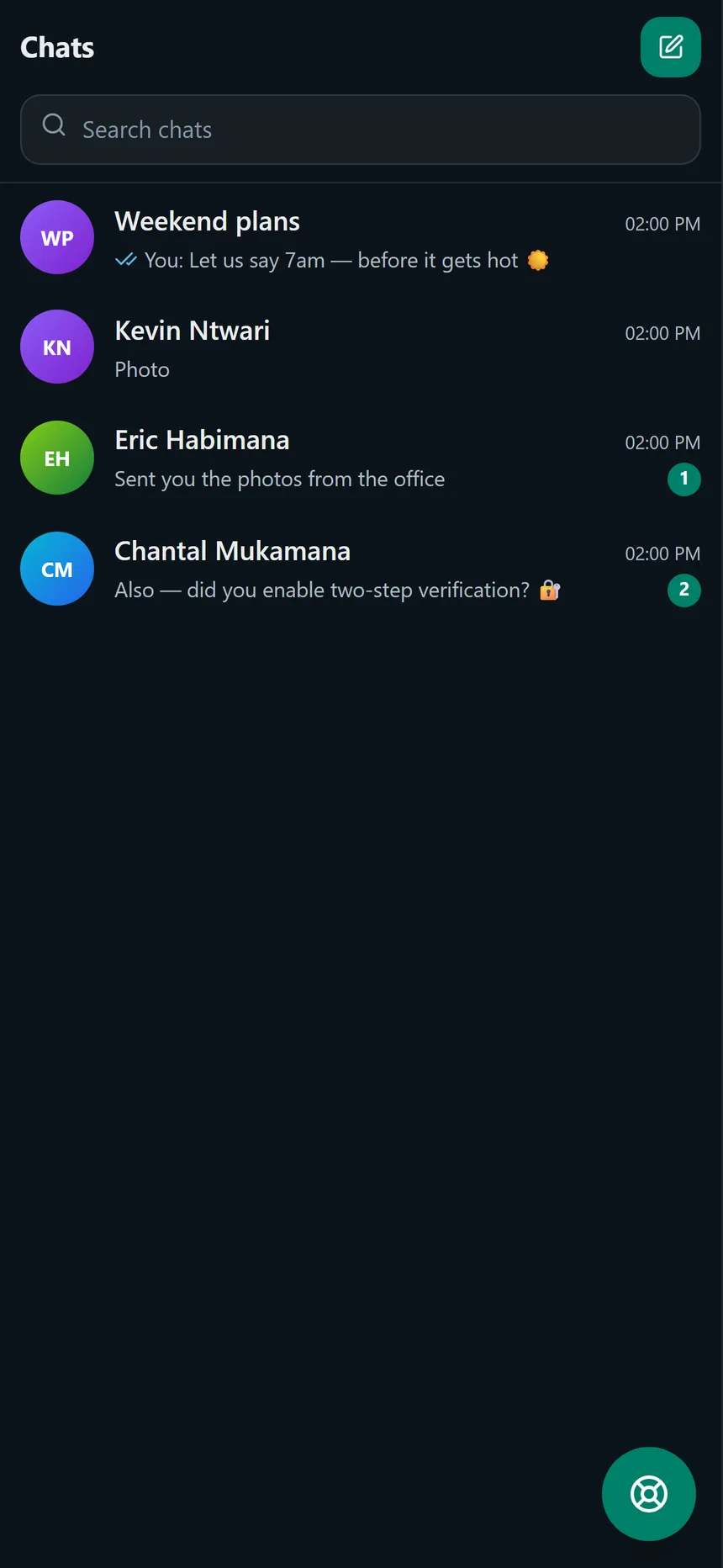
Chatgram in dark mode showing the chat list with a group, contacts and unread badges
Calls built inVoice, video and screen share
Four languagesEnglish, Kinyarwanda, French, Swahili
Two-step verificationAuthenticator app + recovery codes
No adverts, no trackingYour conversations are not the product
Features

Everything you need to stay in touch

Every item below is live in the app today — not a someday list.

Messaging, in detail

Real-time messages with delivery and read receipts, voice notes, photos and files, replies, edits, stars, search and pinned group messages.

Calls that fit the moment

One-to-one and group calls, voice or video, with screen share, mute, camera control and a live timer. Group calls hold up to 12 people, 6 of them on camera.

Status that tells you who saw

Share a photo, video or voice status that disappears after 24 hours — and see exactly who viewed it, newest first.

Groups with real controls

Group photo, admins and permissions, join-request approval, invite links, pinned messages and @mentions.

Chatgram AI, as a normal chat

Chatgram AI sits in your chat list like any contact: ask anything in English, Kinyarwanda, French or Swahili, get streamed answers, rate them, or mention @Chatgram AI in a group.

Notifications that arrive

Android and Windows notifications with the real permission state, a test notification, separate message and call channels, and a do-not-disturb schedule.

Privacy you can switch

Two-step verification with recovery codes, sessions you can sign out, per-person privacy switches and optional read receipts. Messages are encrypted in transit — not end-to-end, and the page says so.

Windows and Android apps

Both apps update themselves: Android checks for a newer APK, downloads it, verifies the checksum and asks you to install; Windows checks in the background and restarts to update.

Calls

Calls that work — and tell you when they do not

Voice or video, one person or a whole group, on all three platforms. The call screen shows what is actually happening instead of leaving you guessing.

One-to-one and group

Call a contact from the chat header or start a group call. A group call holds up to 12 people; the first 6 can use video and everyone else joins with audio.

Audio and video

Start voice or video, mute the microphone, turn the camera off, and switch between earpiece, speaker and Bluetooth on Android.

Screen share

Share a window or tab during a call where the browser or desktop app allows it, with a clear sharing bar on the receiving side.

TURN relay for difficult networks

Chatgram mints short-lived TURN credentials for calls that cannot connect directly, so strict NATs and mobile networks have a relay fallback. If a relay cannot be reached, the diagnostics say so.

Diagnostics and a “no media” retry

The call screen reports the ICE state, the candidate pair, whether a relay is configured, bytes in and out and how many remote tracks are playing. When no media arrives, Chatgram retries the connection and shows the reason.

Calls are peer-to-peer with a TURN relay fallback. Quality depends on both networks — the diagnostics exist so a bad call can be explained instead of guessed at.

Messaging

The small things that make chat feel right

The same conversation on every device, with the controls you reach for every day.

  • Voice notes Record a voice note in one tap and send it; it plays back inline with its duration.
  • Replies, edits and deletes Reply to one specific message, edit your own text with an “edited” label, delete for yourself or delete for everyone.
  • Stars and pins Star messages you want to find again, and pin one important message to the top of a group.
  • Search and shared media Search your chats and open the photos, videos and links from a conversation in one place.
  • Photos, video and files Send images, video and documents with real upload progress and a retry that keeps the file.

Read receipts and delivery ticks are part of the conversation — and you can turn read receipts off.

A Chatgram conversation in dark mode showing sent messages with delivery and read ticks
Preview

Take a look inside

The same app on every platform, designed to feel familiar from the first tap.

Chatgram in dark mode showing the chat list with a group, contacts and unread badges
Your conversations, with Chatgram AI in the list
A Chatgram conversation in dark mode showing sent messages with delivery and read ticks
Live chat with delivery and read ticks
Chatgram AI open as a normal conversation inside the Chatgram app
Chatgram AI is just another conversation
Privacy

Your conversations stay yours

Practical privacy you can see and control — not marketing language.

Encrypted in transit

Every request and every socket runs over HTTPS and WSS with a valid TLS certificate, renewed automatically.

Two-step verification

Add an authenticator app to your account, with ten single-use recovery codes in case you lose the phone.

Privacy, per person

Online status, last seen, photo, about, phone and email are each yours to switch off — and read receipts are optional.

Sessions you control

See every signed-in device and sign out the others in one tap. Changing your password signs them out for you.

Reports reach a real person

Reports land in an admin inbox, and reported content can be reviewed by authorised team members. Every admin action is written to an audit log, and blocked accounts cannot message or call you.

Guarded on the server

Chat, role and privacy rules are enforced server-side, never trusted from the app. Logins are rate limited and repeated failures lock the account temporarily.

Messages are encrypted in transit and stored on the server, so the server can read them. End-to-end encryption is the top item on the roadmap — we will not claim it before it ships.

Download

Download Chatgram for Android, Windows or the web

One account works across all three. Start on your phone, continue on your PC.

Current published builds Windowsv1.1.6 · 82.3 MB Androidv1.1.7 · 1.5 MB Webv1.1.3
Windowsv1.1.6

Chatgram for Windows

Version 1.1.6 · Installer · Unsigned
Size
82.3 MB (86,263,690 bytes)
Released
29 October 2026
File
chatgram-windows-setup.exe
SHA-256
6233ec23bd07cf355d44a417b3f46b39b8c9e85c10b327173a6ff908509c2e66
Requires
Windows 10 or newer, 64-bit
  1. Download and run the installer.
  2. SmartScreen may warn because the build is unsigned — click “More info” → “Run anyway”.
  3. Verify the file with Get-FileHash .\chatgram-windows-setup.exe -Algorithm SHA256.
  4. Chatgram starts and stays in the tray when closed; future updates install automatically.
Download for Windows
Windows 10 or newer, 64-bit · updates itself from /downloads.
Androidv1.1.7

Chatgram for Android

Version 1.1.7 · APK · Debug-signed
Size
1.5 MB (1,589,034 bytes)
Released
27 October 2026
File
chatgram-android.apk
SHA-256
0e8b5d1d42938883af71c8fb28e25014d958116bb2967126c599f0845ae388a8
Requires
Android 7.0+ (API 24)
  1. Download the APK, then allow “Install unknown apps” for your browser or Files app.
  2. Open the file, install it and launch Chatgram.
  3. This is a direct-download build, not a Play Store release. Chatgram updates itself afterwards.
QR code that opens the Chatgram Android APK download
Scan to install
Download APK
Sideload only · camera and microphone are requested only when a call or voice note needs them.
Webv1.1.3

Chatgram in your browser

No install · Any modern browser

The same account and the same chats — open the web app in any modern browser. Nothing to download.

  1. Open Chatgram in this browser.
  2. Sign in with the same account you use on your phone or PC.
Open in browser
Chrome, Edge, Firefox or Safari.

Checksums identify the exact published file — compare the full value before you install.

Getting started

Up and running in three steps

From first launch to your first message in under a minute.

1

Create your account

Sign up with your email address, or continue with Google. We send a 6-digit code to confirm it is really you.

2

Add your contacts

Search for someone by name, email or phone number and add them. Your contact list stays private to you.

3

Start chatting

Tap a contact to say hello, send a photo or voice note, start a group, or call them — voice or video.

What's new

Release notes

Everything that shipped in the current versions.

v1.1.7Android · 27 October 2026
  • Push notifications through Firebase Cloud Messaging (FCM): messages and calls now arrive even when Chatgram is closed or in the background.
  • Full-screen incoming call: an incoming call wakes the screen with a full-screen Answer / Decline screen (including on the lock screen) instead of a small banner.
  • Call diagnostics: a new diagnostics screen records connection quality, the ICE/relay path and the failure reason, so a dropped or silent call can be investigated.
v1.1.2Windows · 27 October 2026
  • Notification settings that show the real Windows notification state, with a one-click shortcut to the Windows notification settings page.
  • Incoming-call alert: a Windows toast plus a tray alert announces an incoming call, and clicking it brings Chatgram to the front.
  • Ships the current web client: Chatgram AI as a standard conversation, group AI mentions, statuses and the admin dashboard features.
v1.1.6Android · 27 October 2026
  • Notification settings that show the real permission state, open the Android notification settings and send a test notification
  • A battery-optimisation prompt, so Android stops delaying background notifications
  • A ringtone call channel and a native speaker / earpiece / Bluetooth switch for calls
  • Calls: the other person's video starts by itself (an avatar shows instead of a play button), "Calling…" becomes the timer once someone joins, and the incoming screen shows who is calling
v1.1.5Android · 27 October 2026
  • In-app updates: Chatgram checks for a newer APK, downloads it over Wi-Fi or mobile data (whichever is available), verifies the checksum and offers "Update ready: tap to install"
  • An update-required screen when the installed version is no longer supported
  • No silent installs: Android asks for the installer approval once, and nothing installs without a tap
v1.1.1Windows · 27 October 2026
  • Desktop app with tray, taskbar badge and auto-update from /downloads
  • Start-on-login and native notifications
  • Background update downloads with a "Restart to install" prompt; updates install on quit
  • A blocking update screen when a version is forced or below the minimum
  • Unsigned build — see the SmartScreen guide before installing
v1.1.2Android · 27 October 2026
  • Fixed the crash on launch ("Chatgram keeps stopping") — the launcher class and the packaged config now match
  • Smaller optimised build with the same signing key, so it installs in place over 1.1.0
  • The keyboard no longer covers the message box, and a friendly offline page explains when the server cannot be reached
v1.1.0Web · 25 October 2026
  • Chatgram AI as a standard conversation, plus group @Chatgram AI mentions
  • Voice and video calls for one-to-one and group chats
  • Moderation tools, data requests and an admin dashboard
FAQ

Chatgram questions, answered

If your question is not answered here, ask in the app and we will add it.

Is Chatgram free?

Yes. There are no adverts, subscriptions or in-app purchases, and no premium tier.

Do I need a separate account for each device?

No. One account works on Android, Windows and the web. Sign in with the same email on every device and your chats are already there.

How do I download the Chatgram app?

Use the Downloads section on this page: “Download for Windows” gives you the installer and “Download APK” gives you the Android build. Both links point at the current files published under /downloads/, and the cards list the exact version, size and SHA-256.

Is Chatgram available in Rwanda?

Yes. Chatgram runs on any Android phone or Windows PC, supports English, Kinyarwanda, French and Swahili, and works with Rwandan +250 phone numbers in contacts and account settings.

How do I install the Android app?

Download the APK, open it, and allow “Install unknown apps” for your browser or file manager when Android asks. Chatgram is not distributed through the Play Store yet, so this is expected. The full steps are in the Android download and install guide.

Windows shows a warning when I start the app. Is that normal?

Yes. The installer is not code-signed yet, so Windows SmartScreen may warn you the first time. Choose “More info” then “Run anyway”. The Windows download and SmartScreen guide has the exact steps and how to verify the file.

What is Chatgram AI and which languages does it speak?

Chatgram AI answers questions, helps with writing and translates between English, Kinyarwanda, French and Swahili. It appears in your chat list like any other contact, and in a group you can mention @Chatgram AI. It can make mistakes, and answers are processed by a third-party AI provider.

Do notifications work when the app is closed?

On Android 1.1.7 and newer, messages and calls arrive through Firebase Cloud Messaging even when Chatgram is closed or in the background. On Windows, the desktop app shows notifications while it is running, including from the tray.

Are my messages end-to-end encrypted?

Not yet. Messages are encrypted in transit (HTTPS/WSS) and stored on the server, but the server can read them. End-to-end encryption is the top item on the roadmap.

Can I make calls?

Yes — voice and video calls are built in. Tap the phone or video icon in a chat header. Direct chats call one person; group calls can include up to 12 people at once, with video for the first 6.

Install guide

Install Chatgram for Windows

Windows installer 1.1.6 · 82.3 MB (86,263,690 bytes)

  1. Choose “Start the download” and open chatgram-windows-setup.exe when it finishes.
  2. SmartScreen may warn because the build is unsigned: choose “More info”, then “Run anyway”.
  3. Follow the installer, then launch Chatgram. It stays in the tray when you close the window.
  4. From this install on, Chatgram updates itself in the background.

Check the file: Get-FileHash .\chatgram-windows-setup.exe -Algorithm SHA256

SHA-256 6233ec23bd07cf355d44a417b3f46b39b8c9e85c10b327173a6ff908509c2e66

Start the download

What you get

No Play Store, no subscription.

Install guide

Install Chatgram for Android

Android APK 1.1.7 · 1.5 MB (1,589,034 bytes)

  1. Choose “Start the download” and open the APK when it finishes.
  2. When Android asks, allow “Install unknown apps” for your browser or Files app.
  3. Choose “Install anyway” if Android warns about installing from outside the Play Store.
  4. It installs in place over an earlier Chatgram build signed with the same key.

SHA-256 0e8b5d1d42938883af71c8fb28e25014d958116bb2967126c599f0845ae388a8

Start the download Open the web app instead

What you get

No Play Store, no subscription.

Web app

Open Chatgram in your browser

Nothing to install — Chatgram runs in the browser tab you already have.

Open Chatgram web

Prefer an app?